This guide walks through onboarding end to end: what happens right after you register, which starting point fits how your office actually operates, a tour of what's really in a new account, how to connect your first portal, and what arrives once it's running.
Academy
Getting started with Elementar
From registering an account to your first automated sync: how to connect a fund-administration portal, what to expect on day one, and a tour of what's actually in a new Elementar workspace.
What happens when you sign up
Onboarding follows the same sequence for every new account:
- Register for an account.
- Verify your email address.
- Add your first fund-administration portal connection.
- Elementar begins syncing automatically, twice a day.
- Documents and email digests start arriving as data is extracted.
Your very first sync doesn't wait for that regular schedule. Once you add your first portal connection, the initial sync runs within 24 hours — after that, Elementar settles into its normal twice-daily rhythm.
Choose your path
Elementar serves three kinds of teams. Everyone starts from the same workspace, but what you'll want to set up first looks a little different depending on which one you are.
Principal / CIO
Family Office
Elementar is a data platform that automatically extracts and normalizes your PE and VC portfolio data from fund-administration portals into one searchable place — no API, no IT project, no rekeying. A structured position dashboard is available once Full Elementar is enabled for your account.
Set up first: connect the handful of portals that cover most of your book.
Elementar for family officesOperations team
Multi-Family Office
Automate the data layer for every household you serve — extraction, normalization, and (once Full Elementar is enabled) a unified dashboard — so no client's data touches another's.
Set up first: onboard one client household, get its portals connected and validated, then repeat the same steps for the next household.
Elementar for multi-family officesWealth manager
Advisor / RIA
Private-market reporting for the clients you report to — automated and unified in one place across every account you manage.
Set up first: connect the portals for your highest-touch client relationships first, then set a Digest Rule so you're notified the moment something needs a reply.
Elementar for advisorsA quick tour of your workspace
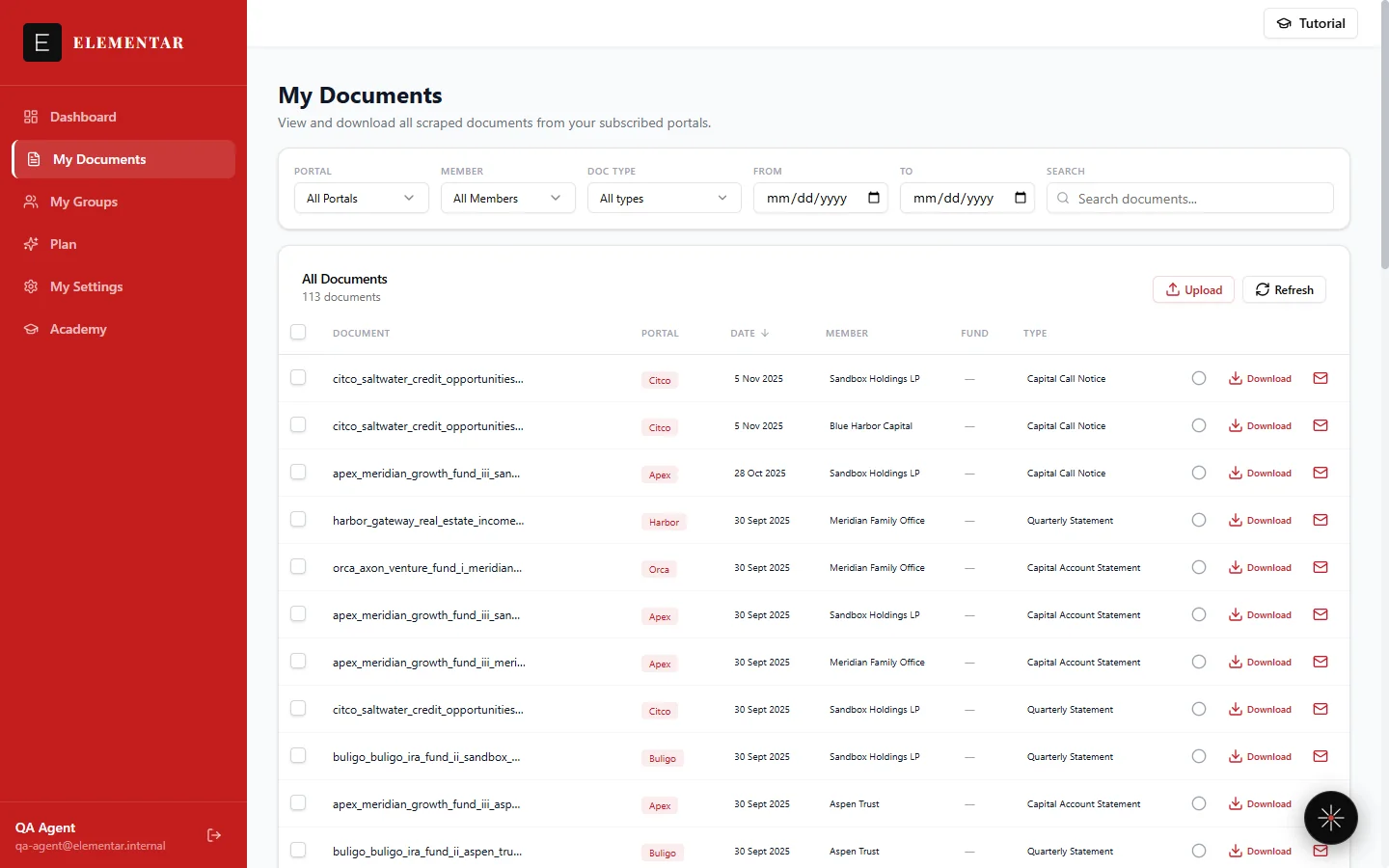
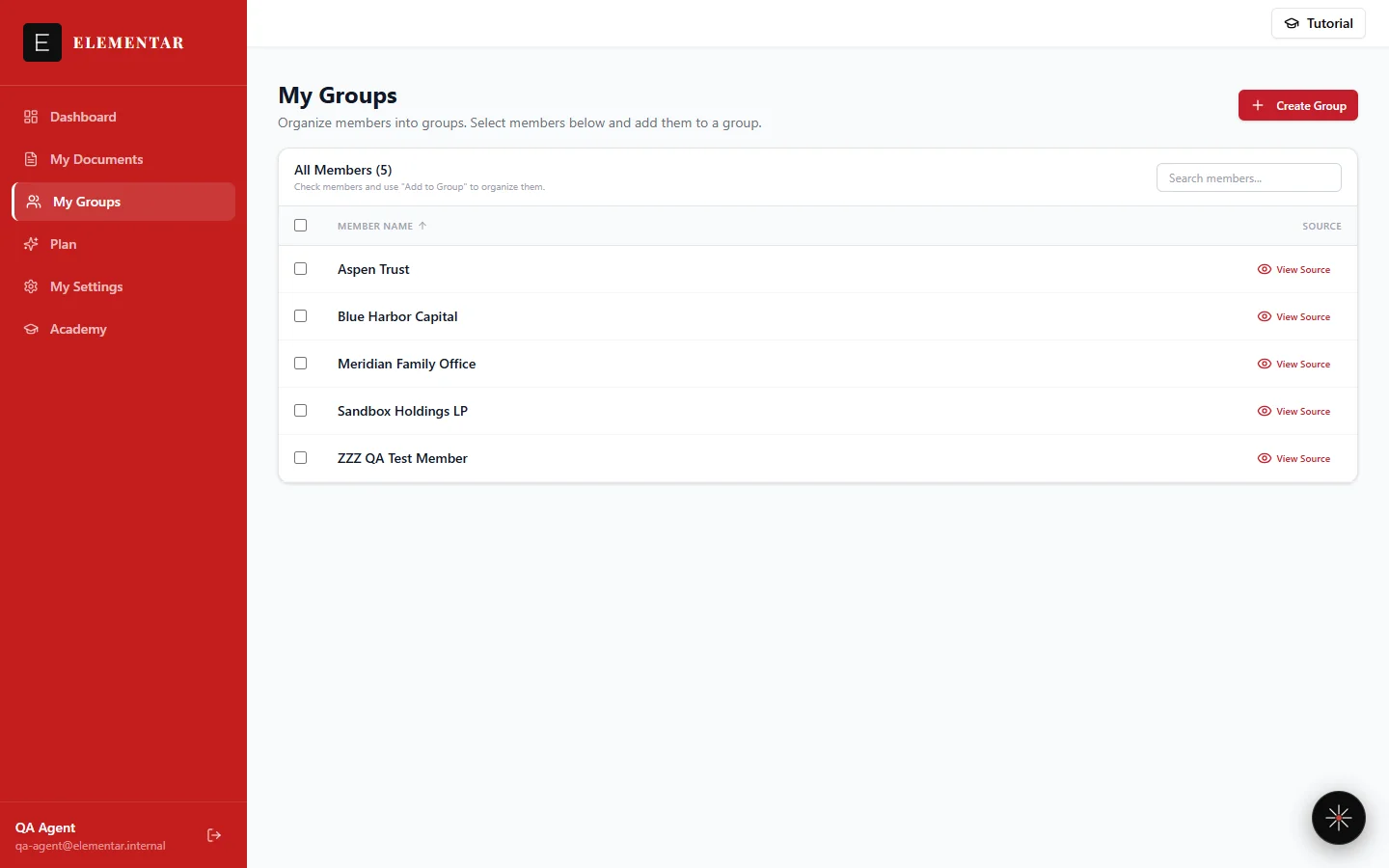
A fresh Elementar account is deliberately lean. Your sidebar shows three items: My Documents, My Groups, and My Settings. Everything below lives in one of those three places, or in the Lumos chat panel that's available from any page.
My Documents
Every document Elementar pulls from a connected portal — capital calls, distributions, statements, NAV reports — is auto-classified and searchable the moment it lands. Filter by portal, member, group, date, or document type, and open any row to see the original PDF alongside what was extracted from it. See Documents for the full walkthrough.
Lumos
Lumos is the AI assistant available from a chat panel on any page. Ask it a plain-English question — or just say "find my latest capital call" — and it searches and lists your own documents instantly. Full portfolio Q&A (holdings, cashflows, NAV, performance stated as figures) is rolling out to Full Elementar accounts. See Lumos for what it can do today.
My Groups
My Groups lets you organize investor or member names into a named group — for example, everyone in one family branch, or every LP under one legal entity. A group is just a name plus a set of member names you select; it carries no financial figures of its own. Once created, it becomes another filter on the Documents page and a targeting option for a Digest Rule.
Connections (inside My Settings)
Connections is where you manage your portal connections — add a new one, check its health, or update credentials if a login starts failing. Once connected, Elementar logs in and syncs each portal automatically, twice a day, so nobody on your team has to do it by hand. See the next section for how to add your first one.
Email, Notifications & Digest Rules (inside My Settings)
Digest Rules is where you set delivery cadence and filters — including targeting a rule to one of your Groups — so a digest email lands the moment new documents are extracted, rather than you having to check back. Notifications is a separate setting: whether you're emailed when a portal connection is auto-paused after repeated failed 2FA logins. Email manages your sending mailbox and address-book contacts, which Digest Rules can target as recipients. See Digests for the full walkthrough.
Billing (inside My Settings)
Billing shows your current plan. Connections is free — portal connections, digest rules, the document archive, and Lumos's document search. Full Elementar adds Rosetta, Elementar's structured extraction into positions and dashboards, currently in Beta at $100/mo. See Plans for the full comparison.
Connect your first portal
From My Settings → Connections, click + Add Connection. You'll be offered two paths:
- Use Catalog Portal — subscribe to an existing connection from Elementar's catalog of 16 fund-administration portals.
- Request Special Portal — submit a custom portal URL for us to build a connection for. A portal not yet in the catalog is typically added within 3 days.
Either way, you provide your portal credentials once. They're encrypted immediately and held in Azure Key Vault — decrypted only by automated processes to log in on your behalf; any human access is restricted and audited. Access is read-only: no funds ever move, and two-factor logins are handled automatically. See How we work for the full mechanics behind extraction and accuracy.
What to expect next
- Twice-daily refresh — new documents are found and extracted automatically, morning and afternoon, starting with that first 24-hour sync.
- Auto-classified, searchable documents — every statement, notice, and report lands in My Documents already classified, with the original PDF one click away.
- Digest emails on your schedule — as soon as new data is extracted, a digest goes out on whatever cadence and filters you set up in Digest Rules.
- Lumos, ready immediately — ask it to find a document in plain English from day one.
- A growing portal catalog — any portal your office uses can be added within 3 days, and you can bulk download your original documents from My Documents whenever you need the files elsewhere.
- A portfolio dashboard, if enabled — if Ledger is enabled for your account (Full Elementar), a structured dashboard becomes available too. See below.
Where to go from here
- Documents — search, filter, review, upload, and send statements and notices. You can also email a PDF straight in: send it as an attachment from your registered address to your Elementar intake address (shared during onboarding) and it uploads on its own.
- Digests — set who gets notified, on what schedule, filtered by portal, type, or group.
- Lumos — your AI assistant for finding documents in plain English.
- Connections — add a portal, read connection health, fix a failed login.
- Plans — compare Connections (free) and Full Elementar ($100/mo, Beta).
- LedgerFull Elementar — structured NAV, capital-call and distribution data, and per-fund position rollups, available once enabled for your account.
Frequently Asked Questions
How long until my first documents show up?
Your very first sync doesn't wait for the regular schedule — once you add your first portal connection, that initial sync runs within 24 hours. After that, Elementar settles into its normal twice-daily refresh, so new documents typically arrive the same day an administrator publishes them.
Do I need my IT team to connect a portal?
No. Elementar works with the portals you already log into — there's no API to build and nothing for your fund administrator to enable. You provide credentials once; they're encrypted and held in Azure Key Vault, decrypted only by automated processes to log in on your behalf, and two-factor logins are handled automatically.
What if my fund administrator's portal isn't in the catalog?
Submit a Request Special Portal request with the portal URL from Settings, Connections. Elementar covers 16 fund-administration portals today, and a portal not yet on that list is typically added within 3 days.
Does My Groups show combined performance figures?
No. A group in My Groups is just a name plus a set of investor/member names — it has no financial figures of its own. It exists to power the Documents filter and Digest Rule targeting, not to roll up TVPI, DPI, or any other metric across its members.
Can I use Lumos from day one?
Yes — Lumos can find and list your documents in plain English as soon as your first sync completes. Full portfolio Q&A — holdings, cashflows, NAV and performance stated as figures — is rolling out to Full Elementar accounts.
Will I see a portfolio dashboard right away?
Only if Ledger is enabled for your account (Full Elementar). It isn't part of every account yet — most new accounts start with My Documents, My Groups, and My Settings, and a Ledger link appears once it's turned on for you.
Get help
Something not matching what you see?
If a step in this guide doesn't match your account, start with the troubleshooting guide — or ask Lumos directly from the chat panel once you're logged in.
Troubleshooting guideAlso: Documents · Connections · Academy home · email eilon@elementarai.com