Connections gets every document from your fund administrators into one searchable archive automatically. Rosetta goes a step further: it reads the numbers inside those documents and turns them into a live portfolio ledger — one row per investor position, one column per figure that matters. This guide walks through what's included, how to read the position table, and where the data comes from.
Ledger (Rosetta) Full Elementar
From statements to a portfolio ledger
Rosetta is what Full Elementar adds on top of Connections: structured NAV, capital-call and distribution data extracted from every statement, rolled up into per-fund positions and performance figures. This page explains what it shows, how reliable it is, and how to get it — it's currently in Beta.
What Rosetta adds on top of Connections
A Full Elementar subscription includes:
- Everything in Connections
- Rosetta — structured data extraction from every statement (NAV, capital calls, distributions)
- Per-fund position rollup — paid-in, distributed, NAV, TVPI/DPI
- Full portfolio Q&A in Lumos — rolling out to Full Elementar accounts; today, Lumos answers document questions
This is different from My Groups in the workspace sidebar. My Groups organizes investor names into groups you define, for filtering documents and building digest rules — it has no financial figures. The paid-in, distributed, NAV, and TVPI/DPI numbers described above live in the separate Ledger dashboard, covered below.
Currently in Beta
Elementar says so plainly in the product: “Rosetta is in trial.” Treat the figures on the Ledger dashboard as a strong first read of your book, not a final one — extraction quality and coverage are actively improving, and the interface itself is still being refined.
Availability is enabled per account, not automatic. Full Elementar unlocks billing access to Rosetta, but the in-app Ledger dashboard is turned on account-by-account during this Beta. If it's on for you, look for a “Ledger” link in the sidebar. Some enabled accounts don't have the sidebar link showing yet — if that's you, go directly to /ledger in your browser's address bar.
If the page tells you the ledger isn't yet available for your account, email eilon@elementarai.com and we'll check enablement.
Reading the position table
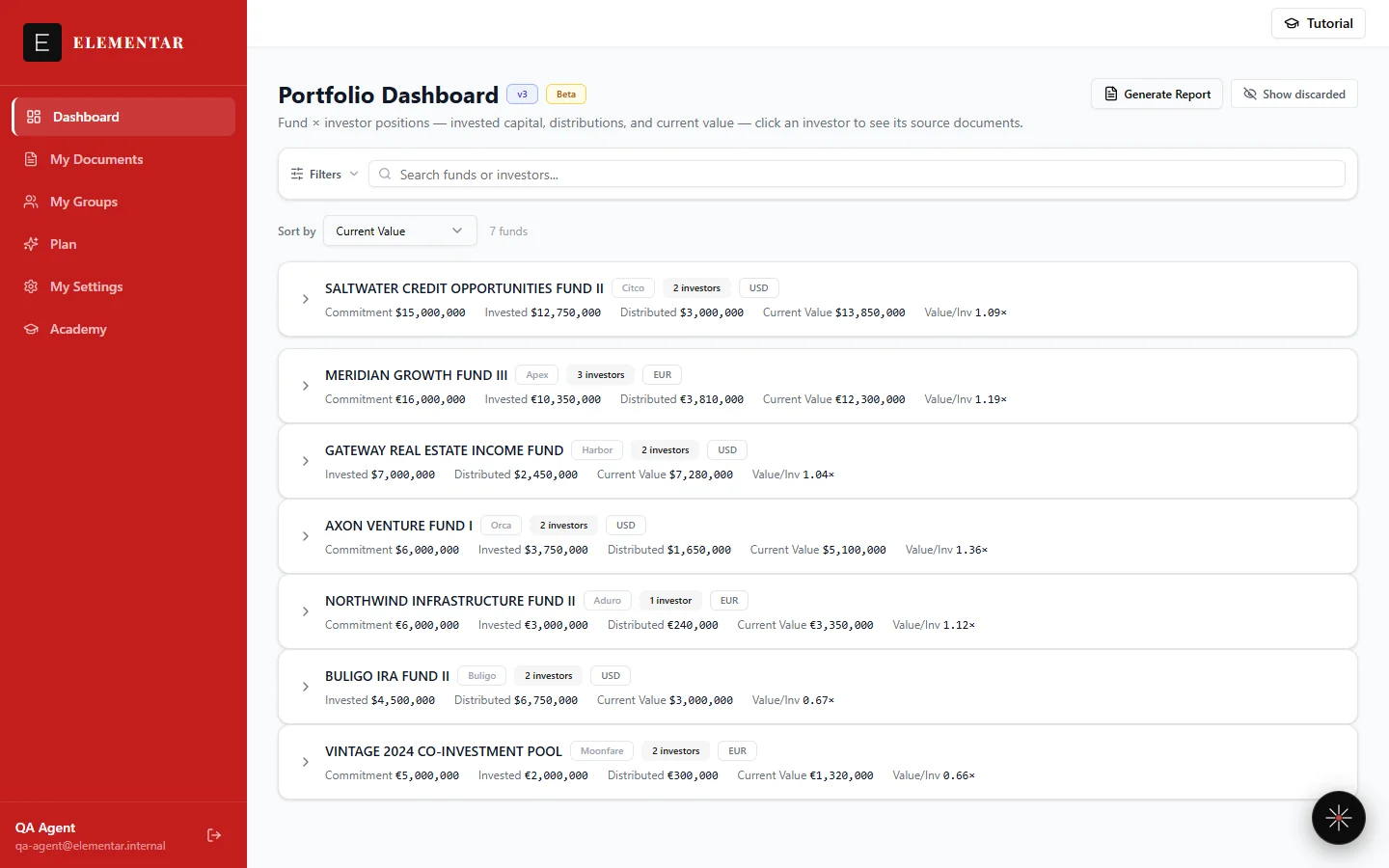
Once enabled, the Ledger page groups your book by fund administrator, then by fund. Expand a fund and each row is one investor position, with these columns:
| Column | What it means |
|---|---|
| Commitment | The total amount pledged to the fund. Shown only when there's still undrawn (uncalled) capital against it. |
| Uncalled | The portion of the commitment not yet called — shown alongside Commitment for the same positions. |
| Invested | Cumulative capital actually paid in to date — the Paid-in capital from the glossary. |
| Distributed | Cumulative cash or in-kind value returned to you from the fund. |
| Current Value | The fund's most recently reported NAV for this position, shown with the as-of date it was reported. |
| Value/Inv | Current Value divided by Invested — how many times your invested capital the current NAV alone represents, before counting anything already distributed. |
| Net multiple | This is TVPI — distributions plus current value, divided by invested capital. |
| Return % | This is IRR. Shows “N/A” when there isn't yet enough dated cash-flow history to calculate a reliable figure. |
Click any investor row to expand it into a timeline of the documents behind every figure — capital calls, distributions, and NAV statements — plus a value-over-time chart. If one investor holds more than one position in the same fund, each position is broken out on its own row rather than blended into a single line. You can also select two or more rows to compare them side by side, and use the filter bar to narrow the view by administrator, fund, investor, currency, or date range.
Accuracy and human review
Our document-intelligence model reaches roughly 86% field-level accuracy on real fund documents, and every field carries a confidence score. Anything uncertain is flagged for human review rather than published silently — so a figure appearing on your Ledger page has either cleared that confidence bar or been checked by a person before it's shown.
How often it refreshes
Twice daily. New documents are extracted automatically, and you're notified by email digest when they land.
Upgrading to Full Elementar
Full Elementar is a $100/month subscription (Beta pricing) that unlocks Rosetta on top of the free Connections tier. Subscribe from Settings → Billing: if you're on Connections, you'll see an “Upgrade to Full Elementar — $100/mo (Beta)” button there. Once you've subscribed, the same Billing tab shows your active subscription and a “Manage subscription” button that opens a billing portal you can use anytime to update payment details or cancel.
Coming next
The following are on the roadmap — not available yet:
- Performance Dashboards — TVPI / DPI / IRR charts, vintage cohort breakdowns, and J-curve overlays.
- Cash-Flow Forecasting — projected capital calls and distributions across your committed portfolio.
- Multi-Investor Roll-up — consolidate trusts, LPs, and SPVs into a single family-level view.
- Smart Weekly Digest — one email a week summarizing what changed and what needs your attention.
Frequently Asked Questions
What does Rosetta add on top of Connections?
Rosetta is Elementar's structured-extraction layer for Full Elementar accounts. Where Connections gives you every original statement automatically, Rosetta extracts the numbers inside those statements — NAV, capital calls, and distributions — and rolls them up per fund and per investor into paid-in capital, distributed capital, current value, and TVPI/DPI. Full portfolio Q&A in Lumos is rolling out to Full Elementar accounts; today, Lumos answers document questions — search and list.
Is the Ledger dashboard available on my account?
The Ledger dashboard is enabled per account, not automatically for every Full Elementar subscription — it's currently in Beta. If it's enabled for you, look for a "Ledger" link in the workspace sidebar; some enabled accounts don't have the sidebar link yet and should navigate to /ledger directly. If the page says the ledger isn't yet available, contact eilon@elementarai.com to check enablement.
How accurate is the extracted data?
Our document-intelligence model reaches roughly 86% field-level accuracy on real fund documents, and every field carries a confidence score. Anything uncertain is flagged for human review rather than published silently.
How often does the ledger refresh?
Twice daily. New documents are extracted automatically and you're notified by email digest when they land.
What's the difference between My Groups and the Ledger?
My Groups, in the workspace sidebar, organizes investor names into groups for filtering documents and for digest rules — it has no financial figures. Paid-in capital, distributions, current value, and TVPI/DPI live in the Ledger dashboard, which is a separate, Full Elementar-only page.
How do I upgrade to Full Elementar?
From Settings → Billing. Accounts on Connections see an "Upgrade to Full Elementar — $100/mo (Beta)" button; once subscribed, the same tab shows the active subscription and a "Manage subscription" button that opens a billing portal you can use anytime.
Full Elementar
See positions, not just documents
Rosetta turns the statements Connections already collects — pulled in twice daily — into a fund-by-fund, investor-by-investor ledger: paid-in, distributed, current value, and TVPI/DPI. It's in Beta and enabled per account — email us to check or request access.
Ask about upgradingAlso: Getting started · Documents · Connections · Glossary